Why do the first 3 seconds of a video ad matter?
Video ad hooks are the opening of the video: the first frame and the first two or three seconds. In Reels, Stories and the Feed people decide in that moment whether to keep watching or swipe. The product, the offer and the button only matter if the hook holds them.
Meta’s own guidance says the same. Its best practices for video ads recommend showing your brand and key message within the first 3 seconds, with motion or a strong visual in the first frame, because people scroll fast. Its advice for conversion testing adds: animate something in the first 3 seconds, promote one benefit per video, and keep it short, ideally 5 to 10 seconds.
Three more Meta recommendations shape how a hook should look:
- Design for sound off. Meta says most people watch with the sound off, so the hook must work as a picture and as on-screen text, not as a voice line.
- Put text in the middle. For Reels and Stories, Meta recommends bold, clear text overlays in the middle of the screen, with the top, bottom and side edges free of text and logos so the interface does not cover them. Our Meta ad sizes guide shows the safe zone.
- Look native. Meta notes that ads which blend in with organic content tend to do better than polished, obviously "ad like" creative.
20 video ad hooks, with an example for a small shop
The hooks come in five groups. Pick one from each group when you test, so your versions really differ. Every example is for a small shop, and the on-screen lines are examples to rewrite for your product.
Visual hooks: something to look at
- 1. Motion in the first frame. Start mid action, never with a still logo. Example: a candle shop opens with the match already at the wick; the flame catches in the first second.
- 2. The extreme close-up. Fill the screen with texture, then pull back. Example: wool sock fibres so close they look like a landscape, then the sock on a foot on a cold floor.
- 3. The quick swap. Two states, one cut. Example: a messy kitchen drawer for one second, cut, the same drawer with the organizer in.
- 4. The reveal. A hand pulls the product out of a bag, box or pocket. Example: a ceramic mug lifted out of paper wrapping, light on the glaze.
Text-on-screen hooks: a line that stops the thumb
- 5. The direct question. One question in the middle of the screen over a plain product shot. Example: "Still buying gifts the night before?" over a gift box being tied.
- 6. The number line. A short line with a number that says what the product does. Example: "One jar. Three months of mornings." over a hand opening a face cream. Only use numbers that are true for your product.
- 7. The warning. A line that makes people want the rest. Example: "Don’t buy a dog harness before you see this." over a dog pulling on a leash.
- 8. The POV line. A relatable caption that reads like a post. Example: "POV: your order arrived on a rainy Monday" over a parcel on a doormat.
Problem hooks: show the pain first
- 9. The problem in one shot. No product yet, just the annoying moment. Example: tangled charging cables on a desk, then the cable organizer.
- 10. The cold moment. A small daily discomfort everyone knows. Example: bare feet on a cold floor, then the slippers waiting by the bed.
- 11. "I tried everything". A line that says the search is over. Example: "Five water bottles later, this is the one I kept." over a row of bottles.
- 12. The myth. Challenge an assumption. Example: "You don’t need a new pan. You need this." over a scratched pan and a bottle of pan cleaner.
Product in action hooks: let the product prove it
- 13. The satisfying use. The product doing its job in close-up. Example: a knife through a tomato in one clean cut, or rain beading on a jacket.
- 14. The stress test. Looks risky, ends well. Example: a glass of water poured over a waterproof backpack, the inside stays dry.
- 15. The scale shot. Show how small, big, light or thin it is. Example: a foldable shopping bag disappearing into a coat pocket.
- 16. Three steps in three seconds. Three fast cuts: open, use, result. Example: open the hair oil, two drops, smooth ends.
UGC hooks: a person talks or reacts
- 17. The first sentence is the point. Selfie camera, no greeting, straight to the verdict. Example: a person holding the mug says "Okay, this is the only mug I use now."
- 18. The delivery moment. Opening the parcel at the door. Example: a hand tears the tape, the product comes out, a short honest reaction.
- 19. The mirror check. A phone try-on in a hallway mirror. Example: pulling on a knit sweater, one turn, a quick nod.
- 20. The handover. Give the product to someone and film their face. Example: a scented candle handed to a partner on the sofa, they smell it and smile.
One honest rule for UGC hooks: a person in your ad can show and like the product, but do not present a staged or AI person as a real customer giving a review. More in our guide to UGC style video ads with AI.
Which hook type fits which product?
| Hook type | Best for | Example |
|---|---|---|
| Visual | Products that look good up close: candles, ceramics, textiles, food | Match touches the wick, flame catches in the first second |
| Text on screen | Products that need a little explanation, gifts, offers | "Still buying gifts the night before?" over a gift box |
| Problem | Products that fix a small daily annoyance | Tangled cables on a desk, then the organizer |
| Product in action | Tools, kitchen, outdoor and care products | Water poured over a waterproof backpack |
| UGC | Clothing, beauty, home and anything people like to show off | Selfie: "Okay, this is the only mug I use now." |
How to test 3 to 5 video ad hooks with the same rest of the video
A hook test only works if the hook is the only thing that changes. Keep the rest of the video, the primary text, the headline, the link and the button the same in every version. Then any difference in results comes from the hook.
- Pick one product and one benefit. Meta’s conversion testing advice is one benefit per video, made from the same base material.
- Choose 3 to 5 hooks from different groups above, for example one visual, one text, one problem and one UGC hook.
- Make each version so that only the first 3 seconds differ. If the whole ad is 5 to 10 seconds, as Meta recommends for conversion testing, each version can be its own short clip with the same ending.
- Publish all versions as separate ads in the same ad set, with the same text and budget, on the same day.
- Give it time. Meta’s guidance for creative tests is at least 4 days before you judge; keep the top performers running and replace the rest.
- Judge by sales first, then clicks, then how many watched past 3 seconds. A hook that gets watched but sells nothing is a good hook for the wrong product.
An example for a small sock shop: version A opens with wool fibres in close-up (visual), version B with "Cold floor again?" in the middle of the screen (text), version C with bare feet on tiles (problem), version D with a person pulling the socks on in front of a mirror (UGC). The last 5 seconds, the price line and the button are identical in all four.
How to make several openings fast in Video Creator
The slow part of hook testing used to be filming four or five openings. With AI video you can make them in an afternoon. In Longneckhorse the Video Creator works like this:
- Pick a model for the job. Kling 3.0 for realistic people and natural movement, Seedance 2.5 for handheld, phone style UGC clips, Google Veo 3.1 for a more polished look, Kling 3.0 Turbo or Wan 2.6 for quick first versions. The credit cost shows before you generate. See the Kling 3.0 page.
- Start from a Templates video. Templates are finished clips made from real posts that went viral. Open one whose opening matches the hook type you want, a reveal or a selfie clip for example, and swap in your product.
- Or start from your product photo. The Video Creator animates your own photo, so the label, colors and packaging stay right. Good for product in action hooks: upload the photo, describe the movement in English, generate.
- Keep it 9:16. Pick portrait for Reels and Stories, and keep text and product away from the edges.
This UGC template from the Templates collection opens the way a selfie hook should: a person looking straight into the camera from the first second, in real light, with the sea behind her.
AI clips are short, so one clip can be the whole ad: the hook is the first 3 seconds, the product and the ending fill the rest. Make three to five clips with the same ending and different openings, and your hook test is ready to publish.
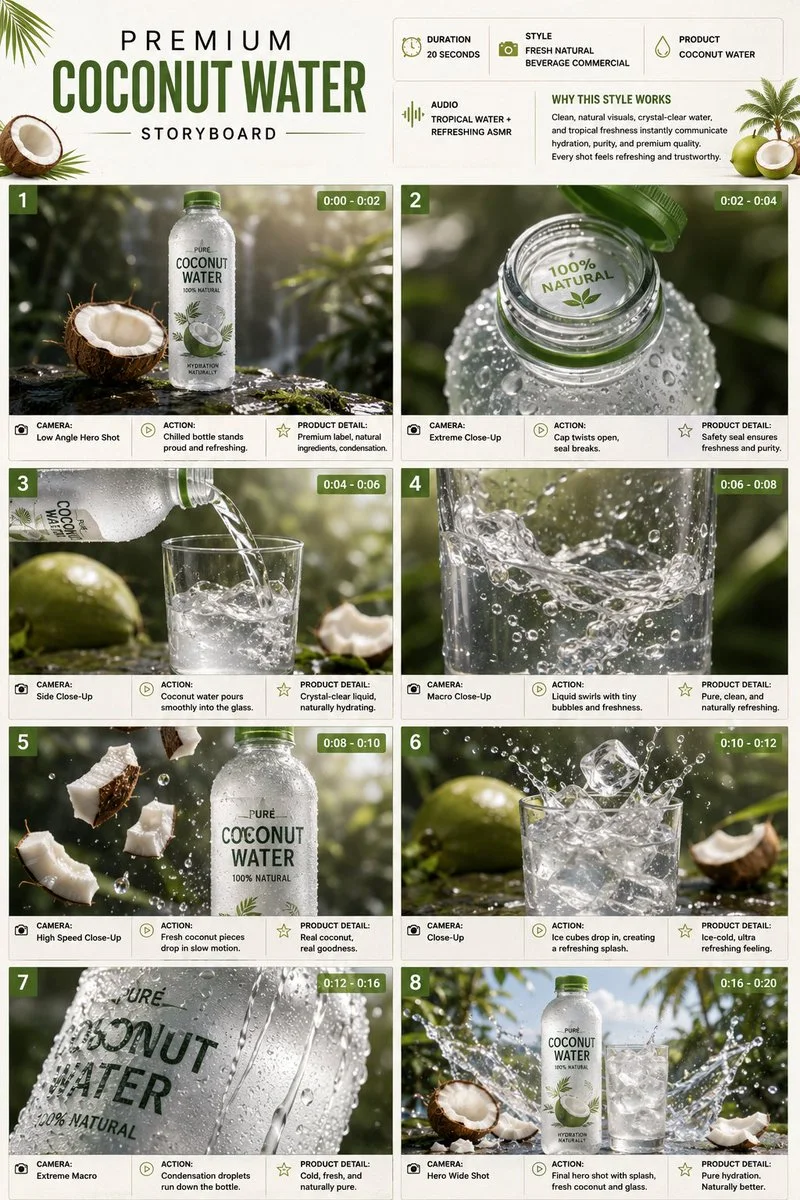
Plan the opening before you generate anything. This storyboard template from the Templates collection lays out a 20 second drink ad scene by scene, and scene 1 is already a hook: the cold bottle covered in condensation fills the first 2 seconds, so the product is on screen from the first frame.
 Made with AI
Publish each hook as its own ad and see which one sold
In Longneckhorse open Meta Ads and click Start simple. Under Select ad visuals pick your clips from My Library, up to 10. Each visual becomes its own ad in the same ad set, so with four clips the button reads Publish 4 ads. Write one primary text and one headline, paste the product link, pick the button, country and daily budget, and press Publish. The ads run after Meta’s review; you can also create them paused and switch them on together. The full walk through is in how to make a Facebook ad.
Simple tags every ad’s link with the ad’s name by itself, so Google Analytics shows which ad brought each visitor. Connect Shopify, WooCommerce or Google Analytics in Connections, and Website analytics shows visitors and orders; the Meta Ads page shows spend, purchases and ROAS for each ad for the last 7, 28 or 90 days. After a few days you see which hook brought orders, not only views. Keep that one and replace the rest with new openings.
Hook mistakes that waste the first 3 seconds
- Starting with a logo or a fade in. Meta’s advice is motion or a strong visual in the first frame, not a title card.
- A hook that needs sound. If the point is only spoken, most people miss it.
- Text at the top or bottom edge, where the profile name, caption and button cover it.
- A great hook for a different product. The opening must lead into what you sell, or people click and leave.
Longneckhorse is built for this loop: make the openings in Video Creator from a template or your product photo, publish them as separate ads with Start simple, and see in Website analytics which one sold. The free plan gives you 300 credits a month with no card.