
Instagram post sizes: the one table you need
You post a photo of your new candle. In the feed it looks great. On your profile the top of the candle is gone, and in the Story the label sits under the reply box. Instagram post sizes are the reason: Instagram works in aspect ratios, not fixed pixel sizes, and each place in the app has its own shape. A ratio is the shape of the picture: 1:1 is a square, 4:5 is a little taller than wide, 9:16 is a full phone screen. Pick the right shape first, then export at a width of 1080 pixels or more and Instagram takes care of the rest.
| Post type | Ratio | Pixels | Notes |
|---|---|---|---|
| Feed photo, portrait | 4:5 | 1080 x 1350 | The tallest shape the feed shows whole. Best choice for products. |
| Feed photo, square | 1:1 | 1080 x 1080 | Works everywhere, takes less of the screen than 4:5. |
| Feed photo, landscape | 1.91:1 | about 1080 x 566 (calculated from the ratio) | The widest shape allowed. Small on a phone. |
| Carousel | Same as feed; all cards follow the first card | 1080 x 1350 or 1080 x 1080 | Up to 20 photos or videos in one post. |
| Reels | 9:16 | 1080 x 1920 | Full screen vertical. 3 seconds to 3 minutes long. |
| Stories | 9:16 | 1080 x 1920 | Also accepts 4:5 to 1.91:1, shown on a background. |
| Profile picture | 1:1 | Square upload, shown as a circle | No official pixel size. Keep the subject in the middle. |
Where do the numbers come from? Meta’s developer documentation for publishing to Instagram says feed images must be between 4:5 and 1.91:1 and between 320 and 1440 pixels wide, Reels and Stories should be 9:16 to avoid cropping or blank space, and carousels take up to 20 items. Meta’s help pages give 1080 x 1350, 1080 x 1080 and 1080 x 1920 as the recommended resolutions for those shapes and say there is no maximum.
What size should an Instagram feed photo be: portrait, square or landscape?
Portrait 4:5 is the shape to use for almost every product post. It is the tallest shape the feed shows without cropping, so it takes the most screen while someone scrolls. A bottle, a pair of shoes or a person standing all fit a tall frame naturally.
Square 1:1 is the safe middle. It shows whole in the feed and loses little in the profile grid. Use it when the product is wide and short, like a sofa or a laptop, or when you want one file that also works as a carousel card.
Landscape 1.91:1 is allowed but rarely a good idea on a phone: the picture becomes a narrow strip with a lot of empty screen above and below. Keep it for wide scenes like a shop interior.
What happens if you upload something else? Meta’s publishing documentation accepts feed photos only between 4:5 and 1.91:1, and Meta’s help pages say taller media may be cropped to 4:5. So a 9:16 picture made for a Story loses the top and bottom when you post it to the feed. Make the feed version separately. Resolution: export at 1080 pixels wide or more; Instagram compresses every upload, which is why a sharp, well lit photo matters more than extra pixels. If you shoot on a phone, our guide on AI product photos from a phone photo shows how to get a clean picture first.
What size should an Instagram carousel be?
A carousel is one post with several photos or videos that people swipe through. Instagram allows up to 20 items in one carousel, and they can be a mix of photos and videos. The rule that surprises most people: every card is cropped to the shape of the first card. Meta’s documentation says carousel images are all cropped based on the first image, with 1:1 as the default.
In practice that means: decide the shape before you make the pictures, and make every card in that same shape. If card one is 4:5 and card three is square, card three gets cropped and may lose part of the product. The simplest system for a shop:
- Make every card 4:5 at 1080 x 1350 pixels. The carousel then fills the same screen as a portrait post.
- Put the strongest picture first. It is the one people see without swiping, and it sets the crop for the rest.
- Use the same background and margins on every card so the swipe feels like one story, not ten random pictures.
- If you mix in a video, make it 4:5 too, or it is cropped to the shape of the first card anyway.
Good carousel ideas for a small shop: one product in five colours, before and after, three steps to use the product, or one product and four details. In Longneckhorse you can make the cards in the Image Creator from one product photo and post the whole set as a carousel from Social media.
What size is an Instagram Reel?
Reels are vertical video that fills the whole phone screen, so the shape is 9:16 at 1080 x 1920 pixels. Meta recommends 9:16 to avoid cropping or blank space: a square or landscape video is still accepted, but it plays as a small box in the middle of a dark screen. Instagram says a reel can be anywhere from 3 seconds to 3 minutes long; for a product, 5 to 15 seconds is usually enough to show it in use. A clean 1080 x 1920 MP4 is all a shop needs.
The cover matters more than people think. On the share screen you pick a frame from the video or upload a custom image, and Instagram says this is what shows on your profile grid. The grid tile is not 9:16, so the top and bottom of the cover are cut off there. Choose a frame where the product sits in the middle, or upload a cover with the product centred.
What size is an Instagram Story?
Stories use the same full screen shape as Reels: 9:16 at 1080 x 1920 pixels. Meta’s technical specifications for Instagram Stories list 9:16 as the format and say 4:5 to 1.91:1 is also supported. A 4:5 feed picture posted to a Story shows whole with a background filled in above and below, so you can reuse a feed post as a quick Story. For the best look, make a real 9:16 version.
File limits from the same page: JPG or PNG up to 30 MB for pictures, MP4 or MOV up to 4 GB for video, at least 500 pixels on the short side. A picture Story shows for a few seconds and a video Story runs 1 to 15 seconds, so a longer clip is shown as several Stories in a row.
Profile picture
Your profile picture is uploaded as a square and shown as a small circle next to every post and Story. We found no official pixel size for it, so upload a square of at least 1080 x 1080 pixels and keep the logo or product inside the circle you can imagine in the middle; the corners are always cut away. A plain logo on a one colour background reads better at that size than a detailed photo.
Why does Instagram crop my posts in the profile grid?
The profile grid, the wall of tiles people see when they open your account, does not show posts at their full shape. The tile has its own proportions, and Instagram has changed them before, so a 4:5 photo can lose a strip at the top and bottom, a square photo can lose strips at the sides, and a 9:16 Reel cover loses the most. Instagram does not publish the exact tile size, so do not design for a precise number. Design for the middle instead:
- Keep the product, the face and any text in the middle 80% of the picture, both ways. Whatever the tile shape, the centre survives.
- Avoid text at the very top or bottom of a 4:5 post. It is the first thing the grid cuts.
- For Reels, pick or upload a cover with the subject in the middle third of the height.
A grid that looks like one set is easiest when every post starts from the same product photo. This template from the Templates collection made a whole 9-picture feed for one product, with this prompt:
Create a 9-image Instagram feed for this product in [the same aesthetic]. Use different locations, angles, and compositions, incorporating people, animals, nature, and various environments while maintaining a cohesive visual style.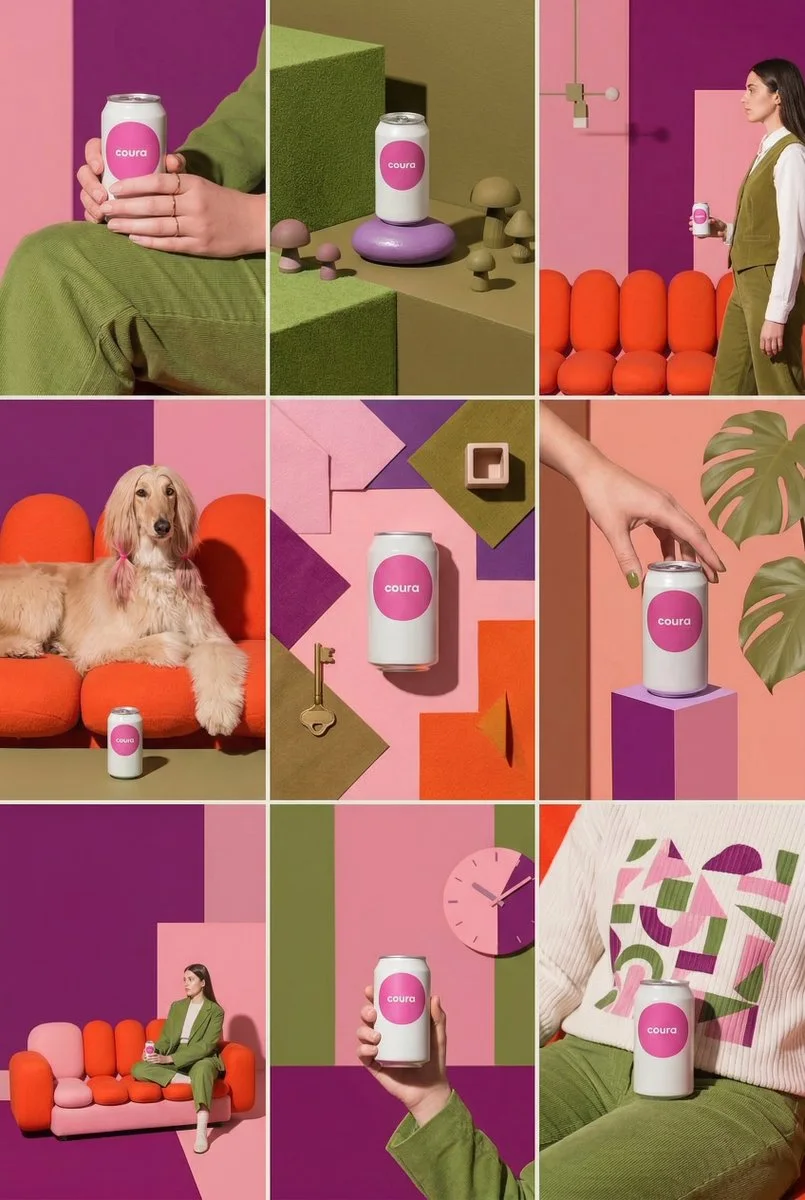 Made with AI
Look at your own grid on a phone after posting. If several tiles cut the product, the problem is the framing, and the fix is to frame the next picture with more room around the subject.
Safe zone for Reels and Stories
In Reels and Stories the app draws its own things on top of your video: your account name at the top, the caption and music name at the bottom, the comment, like and share buttons down the right side, the reply box in Stories. Meta’s guidance for 9:16 content is to keep the edges, top, bottom and sides, free of key creative elements, text and logos, and it warns that phones with screens taller than 9:16 may zoom the video, which crops the edges even more. The practical rule:
- Put the product and all text in the middle of the frame, roughly the middle half of the height.
- Keep the bottom third free of anything you need people to read: the caption and buttons sit there.
- Keep the right edge free: the like, comment and share buttons stack down that side.
- Upload one test Reel as a close friends post and look at it on your phone before you post the real one.
If you make a video in Longneckhorse in 9:16, keep the product in the centre of the first frame and put any extra text in the caption of the Social media post rather than at the edges of the video.
Checklist before you post
- Shape chosen for the place: 4:5 for feed and carousels, 9:16 for Reels and Stories, 1:1 if one file must work for both.
- Width 1080 pixels or more, JPG or PNG for photos, MP4 or MOV for video.
- Carousel: every card in the same shape as card one, strongest picture first, 20 cards at most.
- Product and text in the middle, nothing important at the edges, bottom third of Reels and Stories free.
- Reel cover picked or uploaded with the subject centred, so the grid tile shows it.
- Feed version and Story version made separately, not one file stretched over both.
- Checked once on a phone, not only on a computer screen.
Make every size from one product photo
In Longneckhorse you pick the shape before you generate. The Image Creator makes 4:5, 1:1 and 9:16 pictures from your product photo or from a template in the Templates collection, so the feed post, the carousel cards and the Story come from the same idea with the product in the same place. The Video Creator makes 9:16 or 1:1 video, depending on the model, which covers Reels and square feed video. Everything lands in My Library.
From there, Social media posts or schedules the picture, the video or a carousel to your Instagram account and Facebook Page. On paid plans the Social media calendar lets you plan a week of posts in one sitting. If a post works, the same file goes to Meta Ads from the same screen: see Meta ad sizes for what changes when it becomes an ad, and pricing for the plans.